Who this is for
The order of things
Who does what, and when. Orange is you, green runs on its own, blue is your AI.
- Install the app. App Store soon It is in testing now.
- Pick a folder. Anything the iOS Files app can see: iCloud Drive, Dropbox, Google Drive, OneDrive, Proton Drive, a NAS, local. The one rule: your AI has to be able to reach the same folder, so pick one that syncs to the computer where the AI runs.
- Allow Health access (read only, you choose the types) and notifications (one kind only: "Your AI wrote S27", when a plan arrives).
- Give the MCP to your AI. Paste one paragraph, it sets itself up from these docs. Details below.
- You end a workout on the Watch.
- Next time the phone is unlocked, the app writes
workouts/2026-05-14_0712_PoolSwim_7A1C3E90.jsoninto the folder: distance, time, heart rate every few seconds, every interval with its name, every length with stroke and SWOLF. Vitals land once a day. - The folder syncs to your computer.
- Your AI reads it. No app on that side.
- Rate the session on your Watch when it asks. Effort is the one number nobody else can measure, and it turned out to matter more than heart rate. Apple exports your Effort score and the app picks it up; the app itself never asks.
- When your AI has written a plan: tap "Put on Watch" in the Import tab. Or switch on "Put new plans on my Watch automatically" once, and skip even that.
- Reads sessions, vitals and trends through the MCP, or reads the JSON directly. The folder is the API.
- Writes
plans/S27.json. It shows up in the app within a minute. - Works without the MCP too: the folder also holds
briefing.md, a one-page summary any AI can read. Upload it to ChatGPT, drop it in a Claude Project, mail it to a coach.
Two honest limits, both Apple's. Health data can only be read while the phone is unlocked, so a workout finished with the phone in the bag exports the next time the phone is unlocked, not before. And the Watch keeps its own pool length setting, the plan can't set it.
Connect your AI, first thing
The MCP is the product. The app's onboarding ends on this screen, the README starts with it, and these docs are written so an AI can read them and do the setup itself.
Paste this to your AI
Set up the Health Access MCP for me.
Docs for you: https://healthaccessmcp.com/llms.txt
The server runs with: npx -y healthaccess-mcp
It finds my Health Access folder on its own.
Register it in this app, then list my last 5 workouts.
That is the whole onboarding for the AI side, the same for everyone. llms.txt and llms-full.txt carry the setup per client, the file schemas, the tool list and the plan format. The app puts this paragraph on your clipboard, with your folder's name in it in case the search needs a hint.
Or by hand
claude mcp add --scope user healthaccess -- npx -y healthaccess-mcp
{ "mcpServers": { "healthaccess": { "command": "npx", "args": ["-y", "healthaccess-mcp"] } } }
The first line is Claude Code, the second is the config entry for Claude Desktop, Cursor, LM Studio and most other hosts. Needs Node.js 18 or newer. The server finds your folder in iCloud Drive, Dropbox, Google Drive, OneDrive, Box or ~/Documents; --dir names it yourself. One page per client: Claude Code, Claude Desktop, Cursor, ChatGPT, local models.
What the AI gets
| Tool | Does |
|---|---|
| list_workouts | Compact rows, newest first. One line per session, written for an LLM. |
| get_workout | One session in full: every interval with its name, pace and heart rate, zone seconds, lengths, recovery heart rate, your effort rating. Heart-rate series only if asked. |
| get_vitals | Resting heart rate, HRV, sleep, weight, steps, VO2max by day. |
| training_summary | Per week: volume, sessions, easy-zone share, mean effort, and the cardiac cost trend (beats per 100 m). |
| rate_workout | Stores the effort you told the AI. The AI must ask you, never guess. |
| push_plan | Validates a session (labels under 40 characters, zones 1 to 5) and writes it to plans/. Then the app, then your Watch. |
| get_plan_status | Whether the app has put a plan on the Watch yet: pending, scheduled, failed or cancelled. |
| list_plans | Every plan in plans/ with its state, newest first. |
Arguments, return shapes and the heuristics behind the derived numbers are in the tool reference. The server also exposes the index and every workout as MCP resources (healthaccess://index, healthaccess://workout/<id>) and the same data through the healthaccess command line.
The app, three tabs
Export, Import, Settings. Each tab opens with what it does in one line and a status that is green when nothing needs you. Shown with synthetic example data.
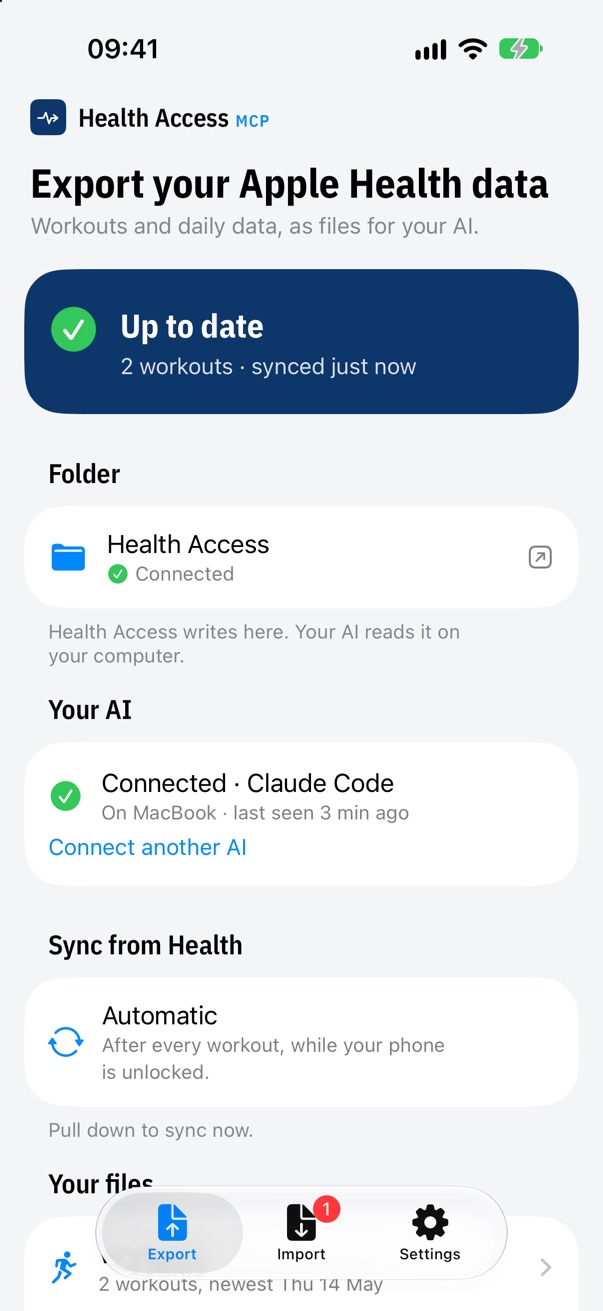
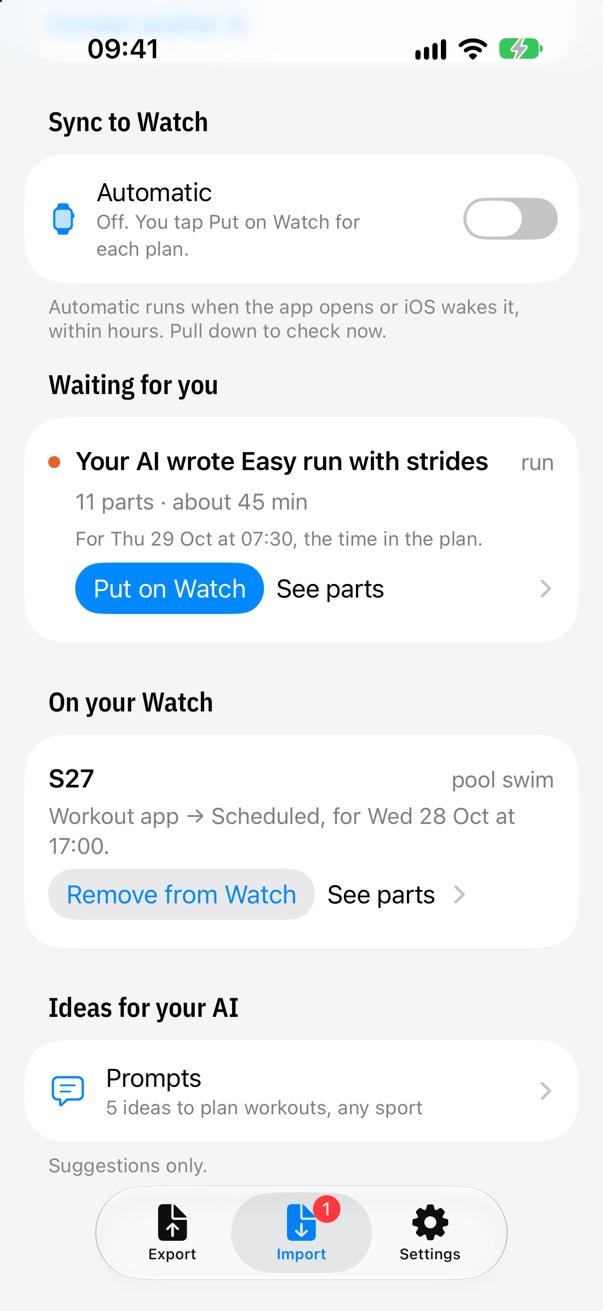
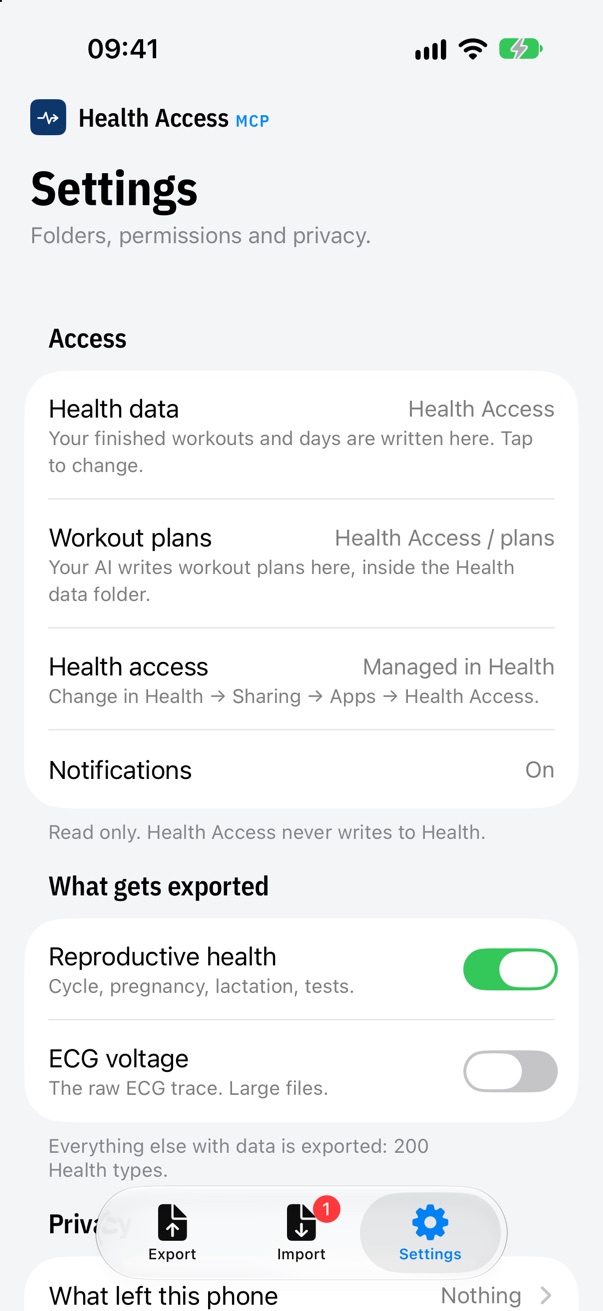
Ideas for your AI
Eleven prompts in two groups, suggestions only, not part of the setup. None assumes a sport: the AI asks. Each one makes the AI ask first, then read the data, then act. A plan written without asking how you feel is a guess with formatting. Full text of all eleven.
Export: understand what your Watch recorded
Weekly check-in
Explain my last session
Am I overdoing it?
How am I sleeping and recovering?
What changed over the last months?
Prepare this for my coach or doctor
Plans: sessions from your AI onto the Watch
Plan my next session
Plan my week
Change my plan
Build up to a goal
Make my workout a Watch workout
Compared with the others
Four other ways to get Apple Health data to an AI exist. The differences that matter: where the data lives, whether you need an account, and whether anything goes back to the Watch. The full table, with prices and what we could not confirm.
| Product | Where your data lives | Account | Plans back to the Watch | Open source |
|---|---|---|---|---|
| Health Access MCP | A folder you choose, on your own storage | None | Yes (WorkoutKit) | Yes, MIT (server and CLI) |
| Health Auto Export | Destinations you pick (files, REST, MQTT) plus a read-only MCP server over your network | None | No; its MCP server is read-only per its listing | No |
| HealthPipe | Their servers in Germany | Yes, Sign in with Apple | No, read-only | Not stated |
| Health MCP: Private Sync | Their encrypted cloud with a trusted execution environment | Yes | Not found in its listing | Not stated |
| Health Bridge for AI | A receiver you run on your own computer | None | No, read-only | Yes |
Questions people type
How do I get Apple Health data into Claude?
Install the Health Access app on your iPhone, pick a folder that syncs to your Mac, allow Health access. After every workout the app writes a JSON file into that folder. Then register the server once: claude mcp add --scope user healthaccess -- npx -y healthaccess-mcp for Claude Code, or the JSON snippet for Claude Desktop. Claude can then list workouts, read a session, read vitals and write a plan. Without the MCP, the folder holds plain JSON and a one-page briefing.md you can drop into a Claude Project.
Does it work with ChatGPT?
Through the files, yes. Through the MCP, not today. ChatGPT connects to MCP servers at an HTTPS URL, on some plans only, and does not start a program on your Mac. Health Access MCP is a program on your Mac that talks over stdio. So with ChatGPT you upload the briefing or the workout JSON, or paste what the healthaccess command prints. What is true today, and the two paths.
Where does my data go?
Into the folder you picked, and nowhere else. There is no server and no account. The folder syncs through the storage provider you chose, which is your account with them, not ours. Usage statistics are off until you turn them on; when on, they carry event names and counts, never a health value, a file name or a path. The exact event names.
Why does it need my phone unlocked?
Apple only lets apps read Health data while the iPhone is unlocked. iOS wakes the app the moment a workout is saved, but if the phone is locked in a bag the export waits until the phone is unlocked again. The app says so instead of pretending.
Can it write workouts to my Apple Watch?
Yes. Your AI calls push_plan, which writes plans/<id>.json into the folder. The app turns it into a WorkoutKit custom workout with the step names on your wrist and puts it on the Watch, scheduled for a date or through Apple's "Add to Watch" sheet. Limits: pool swim and indoor rowing today, step labels under 40 characters, step names need iOS 18, and the Watch keeps its own pool length setting. The plan format and the flow.